
Alpha Studio Pro II: plan your station, take control of your output.
One studio for live shows, Auto DJ, advertising and streaming. Discover how to organize a complete broadcasting day, from the first station ident to the overnight programme.
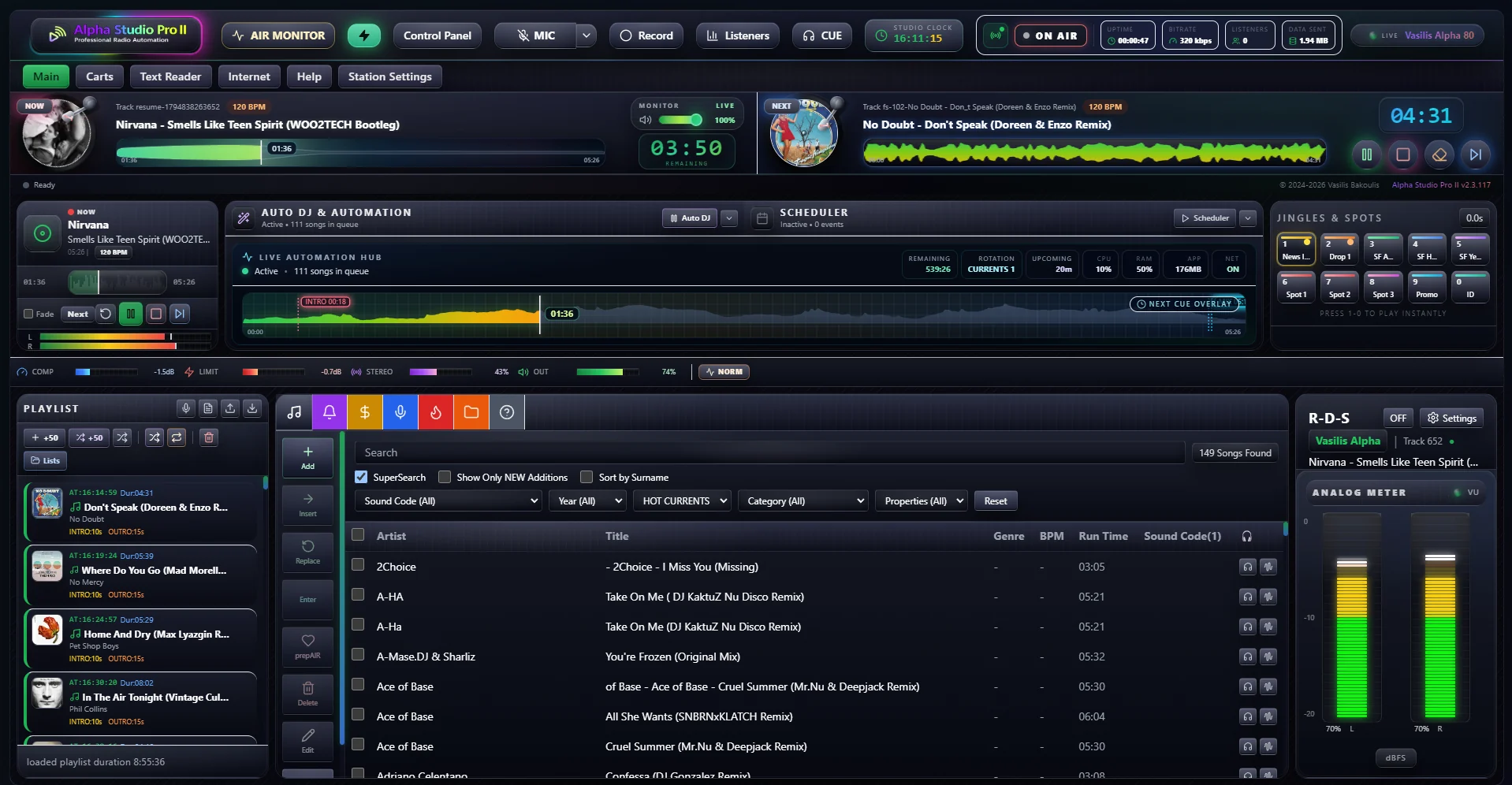
The station ident is playing, the next track is ready, a show starts in a few minutes and the advertising break needs to go out on time. This is where an organized studio earns its place: every element has a clear role, and the person behind the microphone knows what comes next.
Alpha Studio Pro II brings playout, Auto DJ, scheduling, jingles, advertising, streaming and station monitoring together in a Windows application. With 2.3.119 as the current release, it gives presenters and station managers the tools to plan an entire broadcasting day and keep a clear view of the output.
Your output in view, your next move prepared
During a live show, information needs to be immediately available. The NOW / NEXT decks, waveforms, BPM and countdown help presenters prepare the next transition. Start, Intro, Mix and End points provide more precise control over individual tracks, while crossfade connects playback to the flow of the show.
Instant pads and Carts keep jingles, station idents and spots within reach. CUE preview, with a suitable second audio output, lets you prepare material before sending it on air. Technical preparation supports the show and leaves more room for presenting.
Auto DJ with a station identity, from morning to overnight
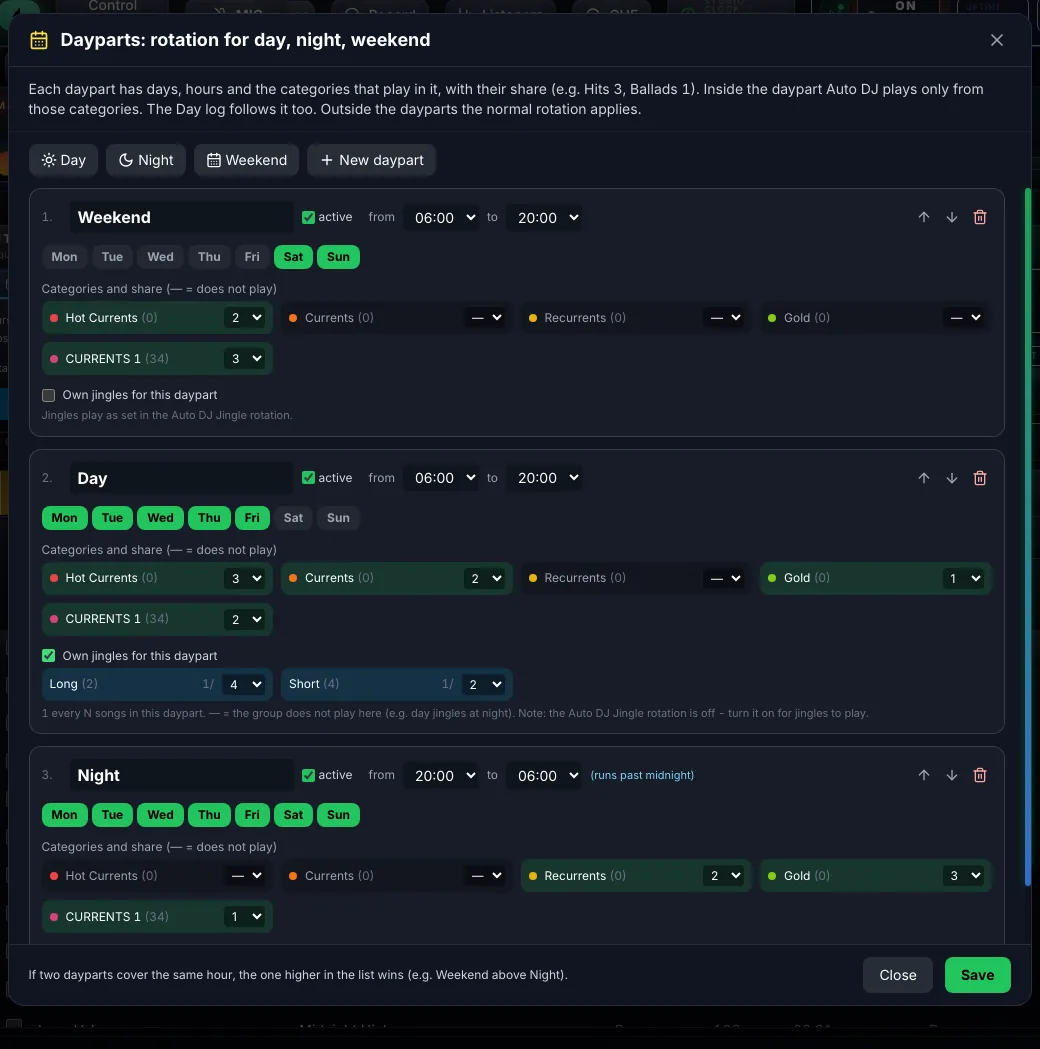
Every time of day has its own pace. A breakfast programme, an afternoon slot and an overnight automated service may need different music. Alpha Studio Pro II lets you organize categories, clocks and artist and title separation rules so that your choices follow a defined music policy.
Auto DJ dayparts support different rotations and jingles for daytime, nighttime and weekends. The scheduler handles events, shows, news, playlists and Spot Blocks at the times you set, including hourly repetition or multiple times within the same event.
A broadcasting day with a clear structure
- 07:00 — BreakfastSelected music categories, station identity and time announcements.
- 18:00 — Live showA presenter, NOW / NEXT decks, Carts and scheduled breaks.
- 00:00 — Overnight Auto DJA different rotation and jingles to match the overnight format.
This illustrates how you could organize your own programme. Your station determines the times and content choices.
Advertising with organized campaigns and recorded broadcasts
When a station works with advertisers, it needs a clear view of the material, the campaign and its broadcasts. Alpha Studio Pro II includes client and campaign management, dates, daily limits and per-client reports.
Broadcast logs, PDF and CSV exports and a transmission report carrying your station's logo and details help you present the recorded results of a campaign in an organized way. Information about a missed transmission and its recorded reason also provides a specific starting point for reviewing and correcting the schedule.
One programme, up to four streaming destinations
The application supports up to four simultaneous streams to Icecast or Shoutcast, in a combination of destinations that suits your station. Each connection has its own server, format and bitrate settings, while audio and track information follow the programme.
This provides flexibility when you need different streams for different uses. Automatic reconnection helps manage a connection interruption, while title and Greek metadata support connect the programme to the information listeners see in their player.
Review your programme alongside audience data
Audience measurements become more useful when considered alongside the programme. The application provides minute-by-minute recording and history for up to 400 days, a daily chart, hourly averages and a day-by-hour view.
Connecting measurements to what was playing at a particular moment helps identify time slots worth reviewing. You can compare hours, shows and music choices, using the available figures alongside your knowledge of the audience and your station's identity.
Continuity tools for everyday station operation
Silence detection, station diagnostics, air logging and standby studio support help you supervise the daily output. Air logging can keep one MP3 per hour so you can return to the content that was broadcast.
For a more complete installation, you can organize a standby computer and test the transition within your own setup. Proper preparation of the computer, connection and backups complements the software's tools.
Browser-based voice tracking also lets presenters record remotely, while time, weather and RDS tools help keep station information and identity within the programme.
See the studio in action
Before choosing software for your station, it is worth seeing how the main tools are organized on screen. The demo below introduces the application, from playout and Auto DJ to scheduling and monitoring screens.
Your first steps with your own station
- Install and activate. Start with a Windows 10 or Windows 11 computer and activate your application licence.
- Organize the library. Add your music folders, review track titles and artists, and create categories that suit your programme.
- Plan the output. Configure Auto DJ, dayparts, jingles, advertising and scheduled shows.
- Connect and test. Enter your streaming server details, check audio and titles from an external player, and test a complete programme slot.
The interface is available in Greek and English, with an in-app guide and automatic updates. For current features, pricing and purchase options, visit the official Alpha Studio Pro II page.
Frequently asked questions
Can I use it for live shows?
Yes. The NOW / NEXT decks, instant pads, Carts, microphone and CUE preview support the presenter's work during a live show.
Can daytime and nighttime use different music?
Yes. Auto DJ dayparts allow different rotations and jingles, while the scheduler organizes shows and events at your selected times.
Do I need a separate streaming server?
To distribute your internet radio to listeners, connect the application to a compatible Icecast or Shoutcast server. Studio software and radio hosting perform different roles.
Can I broadcast to several destinations?
The application supports up to four simultaneous streaming connections. Configure each destination separately using the details and capabilities of its server.
How can I see whether it suits my station?
Watch the demo and explore the actual screenshots on the product page, or contact AlphaServer for a presentation based on the way your station operates.
Give your programme the structure it deserves.
From the first music choice to the last show of the day, Alpha Studio Pro II helps you organize the output with consistency and control.